This chapter is for deciding whether the backend fits a service, and for putting it into production once it does: what it costs in time and memory compared with the alternatives, how the binary ships, and the limits worth knowing first.
What it costs
Same handler, three ways, plus Go for an outside reference. Two pinned cores, 64 connections, medians of three interleaved runs on the plaintext route:
| Runtime | Requests/sec | p50 | p99 | Cold start |
|---|---|---|---|---|
Codename One native, musl | 595,610 | 0.090 ms | 0.249 ms | 0.77 ms |
Codename One native, glibc | 547,761 | 0.065 ms | 4.06 ms | 2.88 ms |
Go, fasthttp | 496,293 | 0.104 ms | 2.63 ms | 2.39 ms |
The same handler on the JVM | 187,745 | 0.260 ms | 1.60 ms | 82.5 ms |
Cold start is the interesting column. It’s measured from process spawn to the first accepted connection, and the static binary reaches it in under a millisecond — about a hundred times faster than the same code on a JVM, and three times faster than Go. That number is the whole serverless argument.
Throughput is the least interesting one. Beating a tuned Go server by a fifth on a microbenchmark isn’t a reason to move a service; it’s only evidence that the translation doesn’t cost you anything.
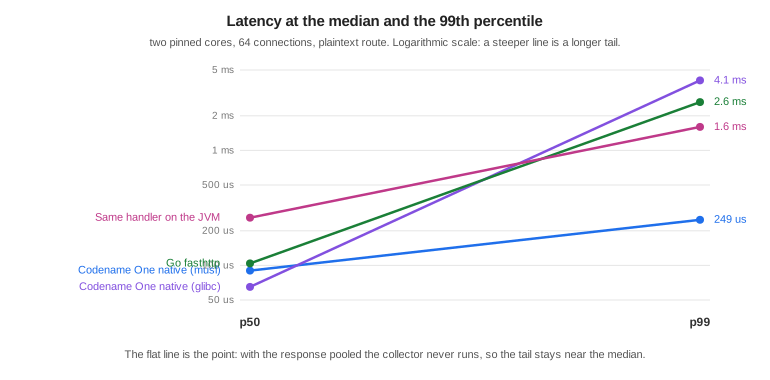
The slope chart is the one that matters. Every runtime here has a similar median. What differs is the distance to the 99th percentile, and that distance is garbage collection. With the response pooled the plaintext route allocates about 0.1 bytes per request, the collector never runs, and the tail stays at 2.8 times the median. Give the same server a handler that allocates a map per request and its tail goes to 80 ms, because the collector shares the cores with the server.
The honest rule is that the tail follows your allocation rate, not the runtime badge. The runtime gives you the tools to allocate nothing on the hot path; it doesn’t do it for you.
Memory and size
| Runtime | Binary or artifact | Resident under load |
|---|---|---|
Codename One native, musl | 7.95 MB static | 10-40 MB |
Codename One native, glibc | 3.19 MB dynamic | 14 MB |
Go, fasthttp | 5.63 MB static | 6.3 MB |
The same handler on the JVM | 0.13 MB jar, plus a JRE | 190 MB |
The JVM row is the same handler and the same protocol code. Everything it costs above the native rows is the runtime underneath it.
The resident figures move around more than the latency ones, because the collector keeps a pool of pages sized to the busiest moment the process has seen and gives them back gradually. At rest the native builds sit near 3 MB.
musl or glibc
Both are supported, and they aren’t equivalent. The static musl build starts faster and has a far shorter tail. The glibc build has a better median, because its allocator is better under contention, and a smaller binary, because it links the system libraries instead of carrying them.
The reason to pick musl isn’t the median. It’s that the artifact is one file with nothing underneath it, which is what makes the container the binary and the cold start a process exec.
What isn’t measured here
GraalVM is missing from these tables on purpose. A fair comparison would have to run the same handler, and this handler can’t run on GraalVM: the runtime’s native methods are ParparVM’s, so comparing would mean benchmarking a different server written against a different framework and reporting it as though the toolchains had been compared. That’s a benchmark worth building, and it isn’t this one.
Deploying it
The musl build is a single static file, so the container that carries it can be empty:
FROM scratch
COPY bench-linux-musl-arm64 /server
ENTRYPOINT ["/server"]
There is no base image to patch, because there is no base image. cn1:backend-package
builds for the machine it runs on; the cross-compiled targets
(musl-x86_64, musl-arm64, glibc-x86_64, glibc-arm64) are produced by
vm/backend/package.sh in the Codename One repository, which drives one builder
image per target.
For AWS Lambda, LambdaRuntime implements the custom runtime loop. The Lambda
Runtime API is a plaintext poll over loopback, so it needs no listening socket and
no TLS, and what it does need is exactly what a translated binary is good at.
Limits worth knowing
The class library is the Codename One runtime, not Java SE. A server dependency that assumes the full JDK won’t translate, and Maven Central isn’t the ecosystem this draws on.
Beans, injection, transactions, scheduling and metrics are resolved at build time, so what a runtime container discovers on its own — beans in a jar found by scanning, a proxy created for a class decided at run time — isn’t available. There is no starter ecosystem, and validation and error mapping are written by hand or generated from the REST contract.
Native packaging compiles Java sources and checks them against the backend’s class library. Kotlin sources aren’t wired into this packaging path yet. Application sources use Maven’s compiler
releaseorsource/target, or Gradle’scompileJava.options.releaseorsourceCompatibility/targetCompatibility. For example, setmaven.compiler.releaseto17or25, or setcompileJava.options.releaseto the corresponding value in Gradle. Use a JDK that supports the selected level. Maven defaults to its own JDK; Gradle usescompileJava’s Java toolchain. `cn1.backend.jdkcan select a different JDK (-Dfor Maven,-Pfor Gradle). The legacyJDK_8_HOMEoverride applies only when application and test sources both target Java 8. The backend libraries and generated wiring remain at Java 8 independently of the application’s language level. Records, pattern matching forinstanceof, and switch expressions can be used by application code. A newer language level doesn’t add Java SE APIs to the native runtime: unsupported API references fail packaging before translation. Pattern matching inswitchneeds a bootstrap the native translator doesn’t implement and fails packaging; useinstanceofbranches for native code instead. Compiled tests likewise honor Maven’stestSource/testTarget/testReleaseand Gradle’scompileTestJavasettings. Compiler arguments, including--enable-preview, are passed to application and test recompilation. Annotation processors on the class path run during those compilations unless disabled with the compiler’sprocsetting.A virtual thread parks on sockets and on nothing else. A PostgreSQL or MySQL query, a
Webcall and a TLS handshake all park it, and its host serves other connections meanwhile. SQLite, file access, resolving a host name andObject.wait()block the host thread that’s running them, and with one host per core, that many concurrent slow calls of that kind occupy every host while other connections wait. A server whose handlers spend their time in SQLite should size for that, or run the thread pool withCN1_HTTP_POLL_MODE=0.TLS runs on the thread pool, whatever the poll mode says. The TLS layer can’t park a read yet, and a blocking read on a virtual thread holds its host for the duration, so one idle TLS client per core would occupy every one of them. The server says so at startup when it makes that choice.
Native builds target Linux. Development happens anywhere a JVM runs.
WebSockets are RFC 6455 over HTTP/1.1. There is no permessage-deflate, so messages go out uncompressed no matter how compressible, and no RFC 8441, so a browser that reaches this server over HTTP/2 opens a second connection for its WebSocket rather than carrying it on the first. Both are what every client already falls back to.
wssworks on the packaged runtime through the same TLS the rest of the server uses, and not in the local loop, which terminates no TLS.
The reasons to choose this are cold start, footprint, deployment shape, and one language across the app and its server. If none of those matter for the service in front of you, use a JVM framework.
External Programs
Backend applications use the shared com.codename1.io.ProcessBuilder and
com.codename1.io.Process API described in Desktop and Backend Processes. The same API serves
JavaSE and native desktop applications. Request-scoped children must be closed
on completion or cancellation; long-lived children belong to a managed bean
with a @PreDestroy cleanup method. A timed wait doesn’t itself terminate a
child. See that chapter for pipe draining, virtual-thread behavior, platform
restrictions, and the differences from JavaSE.
Streaming ZIP archives
ParparVM provides the streaming subset of java.util.zip in its Java runtime.
The same API is declared in the mobile compile-time library. It includes
ZipEntry, ZipInputStream, ZipOutputStream, Deflater, Inflater,
DeflaterOutputStream, InflaterInputStream, GZIPInputStream,
GZIPOutputStream, Checksum, CRC32, Adler32, CheckedInputStream,
CheckedOutputStream, ZipException, and DataFormatException.
Compression uses the existing pure-Java JZlib engine. JVM and Android targets
use their platform implementation of the standard classes.
This is a streaming API, not the entire Java SE ZIP package. Random-access
ZipFile, reverse compression filters, and the FileTime methods on
ZipEntry aren’t provided. Reading a ZIP entry verifies its CRC
and sizes when its end is reached; call closeEntry() to consume and verify
an entry you have only partly read. Closing the input stream doesn’t drain
or verify unread entries. ZIP input doesn’t extract files or interpret Unix
permissions.
Executable files in a project download
Java SE’s ZipEntry has no setter for Unix external attributes. Use
com.codename1.io.zip.ZipArchiveOutputStream when an extracted launcher must
remain executable. It accepts standard ZipEntry objects and adds
putNextEntry(entry, permissions). This helper runs with both JVM and ParparVM
compression and writes the Unix creator platform and external attributes in
the central directory.
public static HttpServer.Response projectDownload() {
    return HttpServer.Response.stream(200, "application/zip", new HttpServer.BodyWriter() {
        public void writeTo(OutputStream destination) throws IOException {
            try (ZipArchiveOutputStream zip = new ZipArchiveOutputStream(destination)) {
                ZipEntry directory = new ZipEntry("project/");
                directory.setTime(0);
                zip.putNextEntry(directory, 0755);
                zip.closeEntry();

                ZipEntry launcher = new ZipEntry("project/run.sh");
                launcher.setTime(0);
                zip.putNextEntry(launcher, 0755);
                try (InputStream source = openLauncher()) {
                    byte[] buffer = new byte[8192];
                    int count;
                    while ((count = source.read(buffer)) != -1) {
                        zip.write(buffer, 0, count);
                    }
                }
                zip.closeEntry();
            }
        }
    }).header("Content-Disposition", "attachment; filename=project.zip");
}
The permission argument accepts 0000 through 0777. The writer infers a
regular file or directory from the trailing slash; it doesn’t create symlinks
or special files. Use 0644 for ordinary files. Names are archive paths with
/ separators. The writer doesn’t sanitize names for extraction, so choose
relative names without .. components.
The runnable example is vm/backend/demo/zipdownload/com/demo/ZipDownload.java.
It serves a small, fixed project at http://127.0.0.1:8099/project.zip:
export CN1_BACKEND_DEMO=demo/zipdownload
export CN1_BACKEND_STANDALONE_DEMO=1
export JDK_8_HOME=/path/to/jdk8
export JAVA_HOME="$JDK_8_HOME"
export PATH="$JAVA_HOME/bin:$PATH"
cd vm/backend
./build.sh ZipDownload com.demo /tmp/zipdownload
/tmp/zipdownload
The same binary can generate a file without starting HTTP:
/tmp/zipdownload --write /tmp/project.zip. Extract it with unzip, then run
project/run.sh. The JVM version can be run with
CN1_BACKEND_DEMO=demo/zipdownload ./run-javase.sh com.demo.ZipDownload.
HttpServer.Response.stream invokes the writer when it sends the response. Open
sources inside this callback and close them with try-with-resources. HEAD and
statuses without a body don’t invoke it, so they don’t open sources. Closing
the supplied output flushes it without closing the connection. The server ends
the response only after the callback returns successfully.
Generation uses the serving worker and fixed transport buffers: 16 KiB for HTTP/1, plus a 16 KiB receive buffer and a 16 KiB native chunk for HTTP/2. It creates no archive-sized byte array, temporary file, or producer thread. HTTP/1.1 uses chunked framing, HTTP/1.0 closes the connection after the body, and native HTTP/2 respects the client’s flow-control window. A slow client holds the serving worker until it grants credit or the socket deadline expires; other streams on that HTTP/2 connection wait while the callback runs.
A disconnected client, HTTP/2 reset, or socket timeout makes output writes throw
IOException. Let that exception propagate so source cleanup runs and archive
generation stops. Cancellation is detected on output I/O; a callback doing
lengthy computation or waiting on its own source must bound that work itself.
A callback failure aborts the response rather than emitting a success terminator.
The local JVM transport supports HTTP/1; test HTTP/2 with the packaged backend.
Format limits and ownership
The default name/comment encoding is UTF-8, with the ZIP UTF-8 flag set.
Charsetconstructors also accept encodings available in the runtime. Names and comments that can’t be encoded without replacement are rejected.Files may be empty. Directories are explicit entries ending in
/. Duplicate entry names and empty entry names are rejected.DEFLATEDentries stream with data descriptors.STOREDentries require a size and CRC beforeputNextEntry; actual size and CRC are checked at close.ParparVM’s writer and
ZipArchiveOutputStreamrefuse ZIP64. Each entry size, compressed size, and the complete archive must remain below0xffffffffbytes. There may be at most 65,534 entries. Caller-supplied ZIP64 extra fields are rejected. A limit discovered while streaming raisesZipExceptionand leaves an incomplete archive; discard that output.Payload memory doesn’t grow with file size. Compression uses a fixed window and output buffer. Central-directory records grow with entry count and encoded names, extras, and comments; the writer caps their serialized total at 16 MiB. Java objects and strings add overhead beyond that serialized limit.
ZIP field lengths are limited to 65,535 encoded bytes. The writer reserves nine extra-field bytes for an extended timestamp where representable. It records UTC modification times at one-second precision for signed 32-bit Unix seconds; dates outside that range use the DOS timestamp, with two-second precision and a 1980—2107 range. Explicit
setTime(0)gives stable metadata.For repeatable archives, fix entry order, names, comments, permissions, timestamps, and compression level. JVM and ParparVM archives have equivalent contents and metadata, but compressed bytes need not match between engines.
finish()writes the directory and leaves the destination open.close()releases compressor state and closes the destination, including after a write failure. A write failure makes the writer unusable. Source streams belong to the caller; use a separate try-with-resources block for each source. No temporary files are created by the ZIP API.Reading supports STORED and DEFLATED ZIP entries, with or without descriptors for DEFLATED entries. ZIP64, encryption, other compression methods, and STORED descriptors are explicitly rejected. GZIP supports concatenated members and validates header and trailer checksums. By default it probes for another GZIP member only when its entire header can be read from buffered or available bytes, avoiding a blocking header read on an idle open connection. For concatenated members on sources whose
available()method doesn’t report readable bytes, callSystem.setProperty("jdk.util.gzip.tryReadAheadAfterTrailer", "true")before constructing the stream. This follows OpenJDK’s read-ahead option: it reads until the source ends and can block on a persistent connection. ParparVM captures the setting when each GZIP stream is constructed.
These explicit ZIP limits belong to the ParparVM implementation and the CN1
helper. The platform’s own java.util.zip.ZipOutputStream may have broader
limits, including ZIP64 support.